
5000+ Projects
400+ Clients
Since 1986
5000+ Projects
400+ Clients
Since 1986
by M.J.Gururaman, HVAC Engineer & Lucky Balaraman, Executive Director, The Magnum Group
Courtesy MicroStation User Manual
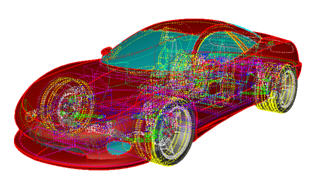
Are you ready to pass out using basic “heavy” AutoCAD to draw complex 3D objects? Here’s how to revive yourself: try MicroStation.
MicroStation is the flagship CAD platform of Bentley Systems Incorporated (annual revenues: $400 million +) and is a boon to the 3D modeling industry. It’s a powerhouse for drafting 3D objects, in particular objects with complex surfaces.
If creating and editing surfaces with AutoCAD can be likened to creating fire by rubbing two stones together, achieving the same goal with Microstation is like lighting a match.
That is because MicroStation has all the tools you’ll ever need to edit minute surface details as well as generate the surface finish of your dreams.
MicroStation embodies various strategies for creating surface components like using networks, edges, sweeping along traces. It has various surface editing options such as trimming, untrimming, blending and for integrating.
There’s a tool called “Evaluate Surface” which catches sharp points on smooth surfaces and a tool called “Analyze Curvature” which quantifies the degree of curvature for you to decide whether to change it or leave it be.
MicroStation’s “Accudraw” tool enables you to lock a particular axis while working in 3D workspace.
If an object is incompatible with a particular tool, a symbol warns you so that without proceeding further you can choose an alternate object that is works with the tool.
The Magnum Group are expert MicroStation drafters. View our capabilities here
We’re not paid salesmen for MicroStation, oh no… we’re a company that specializes in drafting CAD for worldwide customers, and every word of what you read here is based on our tens of thousands of hours’ experience in the subject. We use AutoCAD and Microstation, and just had to emote about this or develop a best-in-class migraine.
If 3D modeling is your game (as it is for us), think seriously about MicroStation: Life might just get a whole lot easier!
The Magnum Group are expert MicroStation drafters. View our capabilities here


© 2026 The Magnum Group. We prohibit reproduction of our content in any form without our specific, prior written permission.